Showing posts with label computers. Show all posts

Aug 27, 2008

RE: Email

I've been thinking about email a lot lately. As much as I am a fan of it's convenience, sometimes it also drives me nuts. I am the type of person who needs the emotion and inflection to determine what "that's supposed to mean."

Several week ago PhD Comics published a strip that illustrated email communication between grad students and professors.
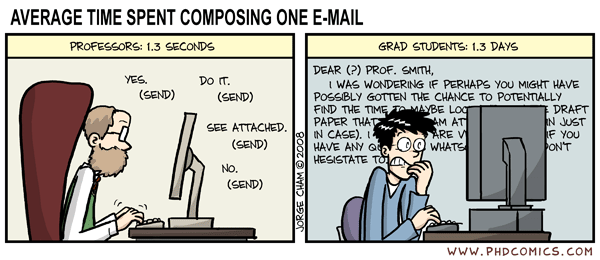
This describes most of the emails that I write to professors, but was especially true last night as I was trying to word two emails about setting up appointments to talk about comps and diss committees. In grad school, this is second only to asking someone to be your advisor in terms of places you might accidentally screw up and ruin your academic life (a subject for another post).

Of course while I spent nearly 1 1/2 drafting the two short "can I meet with you" emails, I received this*...
dear ms. b,
i saw a spot open in your english xyz class and i was just wondering if i could join your class. I talked to the english department and the lady told me to email you. When you get word i think she said that you need to email someone named john doe and he can approve it? i'm not too sure. but just let me know. thanks Jane Doe

While my response should have the brief "prof" No (send) response illustrated above, I explained that it was too late to join the class and then added the following (courtesy of M)...
For future reference, you may want to double check your emails for proper punctuation, etc. when emailing an instructor. I am sure you would want to come across as professional as possible.
Yes, I am that prof who sends snarky emails.

*Names and course descriptions have been changed to protect the innocent and the guilty. Punctuation and capitalization have not been changed at all. Please note the capitalization of the student's name.

Jun 18, 2008

Evernote v. OneNote

I realize that this is a really obscure question, but first a little background. I've been playing around with notebook programs now that I've become slightly obsessed with tagging and internet organization apps and I have to keep a research log for my very last class ever. I'm not the type of person who keeps pages of notes separate from the original text. I write on the text, highlight, draw arrows, and even sometimes reminders about things not related to the text (Sorry B). So for me the idea of researching and then submitting separate paragraphs about the text sounds like the least kind of helpful research log I could ever use. Nearly all of the readings are in PDF form, so the logical idea was to use some sort of web program that would capture the text, clip it, and then allow me to type in the margin.

Zog told me about Evernote, but while I was waiting on approval from Evernote for an account, I discovered OneNote. Now, Evernote will allow me to import the notebook from One Note, but it lost some of it's editability in the process. I would prefer to actuatly use Google Notebook, but at this point it does not offer the interface with PDFs that I currently need. Thoughts on which application is better...more user friendly...more universal.

Jun 6, 2008

Who knew a label was so useful?


When I started blogging, I was well aware of the fact that I was years behind in technology. I surfed the internet, emailed, even had my own course website for a while, and collaborated on Google Docs, but I had never really taken the time to investigate any of the programs I had heard friends talk about. In my mind a label was a piece of sticky material that was sold in sheets.

Part of my aversion to looking into social networking and other technological innovations was the computer situation. My laptop was good, but it was a little dated and I tried to avoid as many ad-ons and processor drains as possible. When that computer died in an unfortunate run in with Diet Dr. Pepper, we bought a new desktop that happened to come while I was on my brief summer break and I discovered the label.

At first there was a lot of set up time that seemed to be yet another way of wasting time, but the product has been well worth it. I went through my web history and bookmarked everything in Google Bookmarks. I generally use the same 2-3 computers and don't access every site on every computer, so I had just used windows bookmarks in the past. As I transferred them, I labeled everything. This accomplished two things, one is made the drop down list much more manageable and two it made me really stop and think about how and why I use various websites. Initially, I had things labeled in fairly specific categories, but what I discovered that I love about labels (as opposed to the older folder systems) is that the same bookmark can appear in two different places. For example, my school email is listed under "teaching" and "email."

By chance, I had explored Google Bookmarks before other applications, but as I moved on to programs such as Reader and Notebook, I discovered that the system I put in place for bookmarks really was helpful in my everyday life. The materials and websites I have gathered for my dissertation can be quickly located under "diss" in all of my applications. While they don't quite all interface as much as I would like--I can't search reader for a label and pull up things in Notebook yet, I've been amazed at how much more organized it has made me. I was worried that like real and electronic folders I would end up with duplicate versions of similar categories (Ex. Children's lit, Children's Literature, children's lit, etc), but since Google references my other labels and suggests an option, this hasn't happened yet.

I'm definitely a fan, and I'm amazed I made it this far without the electronic label.

Jun 2, 2008

Computer Update


Greg took the laptop apart and let it dry out completely. Thursday night while M and I watched the LOST season finale, he put it back together. In true Dharma fashion, the green power light came on but nothing else.

The verdict is still out on the hard drive. Thanks to Matt's suggestion, I went out to buy a hard drive enclosure, but Best Buy only had one and it was 4x the price of the ones I found recommended online. I don't need a padded case to carry the drive in, I just need something that will recover my data.

Since then, I added the shortcut address to Google Docs to my address book and am developing a system for backing up all (important) documents. I can live without copies of old conference programs, but I can't afford to lose my dissertation materials or grade books.

Even though we weren't planning on buying a new computer for a while, we ended up buying a new one yesterday. Just last week, I was reading an article about how much energy is wasted in the production of new computers. My laptop was definitely in need of an upgrade, but it wasn't totally useless (at least until it met the cup of Diet Dr. Pepper). Greg has my sister's old laptop, which is a very portable Dell Inspiron 300m that worked better for mobility than my paper weight of a laptop. In order to allow me to grade and write and research and stay married to someone with a computer degree we need two computers. We opted for a Dell desktop this time. Greg doesn't really have a need to take a computer with him anywhere except when we travel, so we opted to maximize the power and speed for our $ with a desktop.

The new computer will be here next week sometime, the hard drive enclosure hopefully sooner.

May 29, 2008

The Death of a Laptop

My laptop is in a million little pieces on our living room floor. Last night I spilled Diet Dr. Pepper on it and fried it. Technically, I don't know for sure that it is gone, but the screen was frying as Greg was trying to pull the power. Unfortunately, I recently went through my email and downloaded a bunch of files in order to clean out my email. The plan was to then back up everything and reformat the laptop in the next couple of weeks. The hard drive appears to be okay (Greg took the entire computer apart and the hard drive wasn't wet at all).

I don't hardly ever drink soda anymore, and I never drink it that late a night. I literally sat down to check email for just a minute, and before I knew it I was sobbing on the phone to Melissa while Greg was taking the laptop apart. Luckily, this did not happen in the middle of a semester (or worse at the end of a semester). However, there were a LOT of files on that laptop that I don't have backed up elsewhere. Dissertation materials, syllabi and teaching materials, gradebooks, conference papers, primary research, and 6 years of grad school work. I have several documents on my flash drive (Thanks to the fact that in order to print at work, we had to use a computer that wasn't connected to the internet).

I'm probably going to send out a mass email to colleagues and professors with a "if you have anything" will you please send it back to me plea. Then I'm saving everything to Google Docs. Looks like I will be computer shopping sooner than I had planned.

May 21, 2008

Rerouting

I think our Belkin router has officially died. Luckily out neighbors don't password protect their routers, so I can still get online. Anyone know of a good (and fairly inexpensive) router? I'm more interested in the good quality than that price, especially since this one is less than 2 years old.

I'm not sure what killed it, but it's been acting up for a while now. I wish that the ancient cabinet television or the incredibly slow desk top would die, but no.

May 19, 2008

Focus

I finally psyched myself up for a day of writing after several days of vacation, and ISU's network went down today. I guess I will take one more day of reading for fun, watching tv, and surfing the internet.

In other news...I finally found time to read Dr. Franklin's Island. It's been on my shelf for over a year, and I'd heard several people talk about it, so I thought I should read it. It's bad. It's painfully obvious, and definitely won't make any of my YA sci-fi lists.